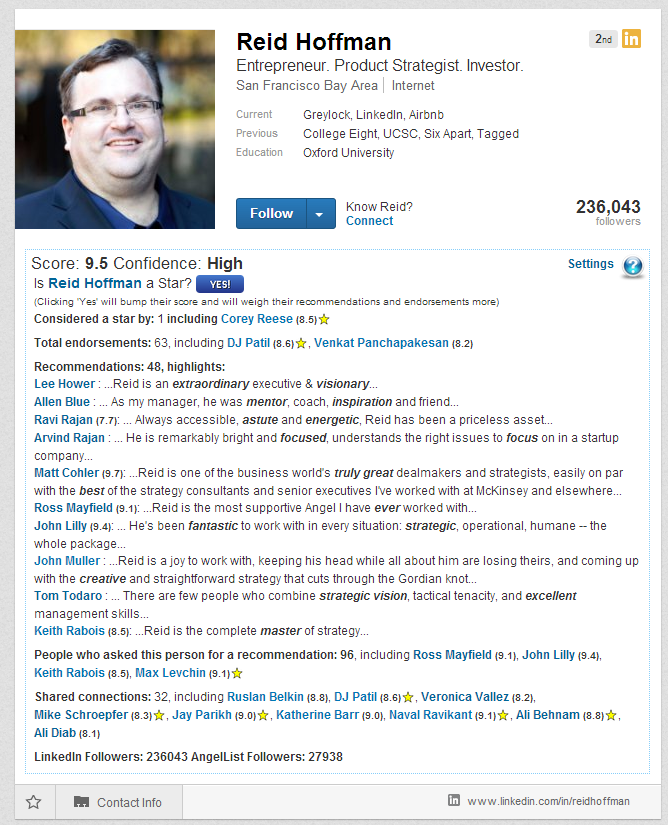
Star Finder Plugin is a Chrome extension that helps recruiters and hiring managers quickly score LinkedIn profiles. Once Star Finder Plugin is installed, which takes about five seconds, it will compute a score for every LinkedIn Profile you open in your browser. The score is based on:
- The number and quality of someone's LinkedIn recommendations, especially from high-score individuals
- The number of their followers at sites such as Github, AngelList, and the like.
- The number of endorsements from and the number of connections with high-score individuals.
- The number of Star Finder Plugin users, especially high-scoring ones, who marked this person as a Star
- Whether the person worked for the companies you target
- Whether the person's profile contains the keywords you target.
The Star Finder Plugin will display the score right on the user's profile page under the user's profile picture, together with all the supporting information.
Installation
To install the Star Finder Plugin, please follow the instructions on the Installation Instructions page.
Contact Us
Please send all your questions or feedback to beta@starfinderplugin.com.FAQ
Q: What platforms/configurations are supported by Star Finder?
A: Star Finder works under Windows, Mac, and Linux, as long as you are using the Chrome browser. Star Finder does not as of now work with other browsers or mobile devices.
Q: What LinkedIn account types are supported?
A: All LinkedIn account types except for Recruiter are support for now.
Q: Does Star Finder copy any of my private data and send it to any 3rd party, e.g., LinkedIn?
A: Star Finder does not copy any of your private data to any third party sites. Star Finder does store on its servers information about the profiles you've opened, their scores, and the people you've marked as Stars. This information is not shared with any 3rd parties.
Q: How are Star Finder scores calculated?
A: Star Finder calculates the score using sophisticated formulas that take into account all the metrics listed above. Generally speaking, a person's score is positively influenced by
- The number of high-scoring people on LinkedIn that recommend, ask for recommendations, endorse, and connect to.
- The quality of their recommendations, especially from high-score individuals.
- Their number of followers on LinkedIn, GitHub, and AngelList.
- The number of people who explicitly mark the person as a "star"
- The number of matches between the person's profile and the companies and keywords you target (set them in "Settings").
Q: A lot of the scores I see are very low (4.0). What does it mean?
A: Star Finder learns over time. The more people use Star Finder - the better it works. A simple quick way to improve the quality of its scoring is to mark all great people you know as "Stars". You don't even need to be connected to someone on LinkedIn to mark them as a Star.